
I’m using Microsoft Outlook 2007 and I think it’s a great piece of software.
It has a built in RSS feed reader. Typically I use Google Reader but as that can’t handle authenticated feeds I’m using Outlook for all of my work related Sharepoint feeds.
In order to introduce people to RSS, Microsoft have included two “standard” RSS feeds: “Microsoft At Home” and “Microsoft At Work”.
The only problem is, I’m not really interested in reading these feeds.
No matter how I deleted these items:
- Deleting them from the RSS folder
- Deleting them from Tools | Account Settings | RSS Feeds
Every time I restart Outlook the feeds are back !
Here is how my deleted items looks:
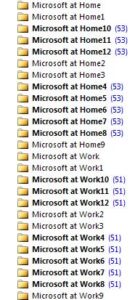
Any thoughts on how I can make the RSS feeds go away and stay away?
7 replies on “How Annoying is the Microsoft At Home RSS Feed?”
Try deleting the feeds from Internet Explorer. Open up your favorites and then click on the Feeds tab.
I’ve been having the same problem. I don’t know if this will have solved it, but I suspect it might.
I have since wiped the machine so unfortunately I can’t test your suggestion.
If it ever happens again I’ll try that and let you know.
Ross
RSS feeds are really great because you are always updated with the latest news or blog posts.~;”
@Fraser Page
Your idea helped me. RSS feeds are gone, finally!
I’m constantly getting emails from these two “services”. I try to unsubscribe, and the “manage subscriptions” page shows me as not having any subscriptions. Under IE Favorites, there are no RSS Feeds listed.
I’m constantly getting emails from these two “services”. I try to unsubscribe, and the “manage subscriptions” page shows me as not having any subscriptions. Under IE Favorites, there are no RSS Feeds listed.
Checked RSS Feeds in Outlook 2010 Account Settings – that’s where they were. Gone now! Thanks!
You found their location before I could respond. I hope this works for you, what happened with me was these RSS feeds would intermittently be “re-installed” by “something”.